3.4.4. 对片段均匀着色(OLEX2使用手册)
原文如下:
Colour fragments uniformly
You can make a selection by one of the earlier described ways, then you can type ‘group’ in the command line. This will transform the selection into a group, rendered with one colour. The group colour can be changed in the ‘Material Properties’ dialog accessible by right clicking on the group and choosing Graphics->Draw Style from the context menu. By default the groups override the grouped object colour; however some special effects can be achieved by colour blending.
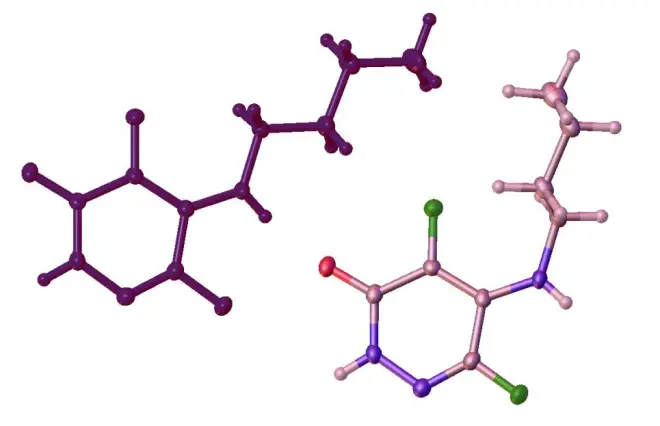
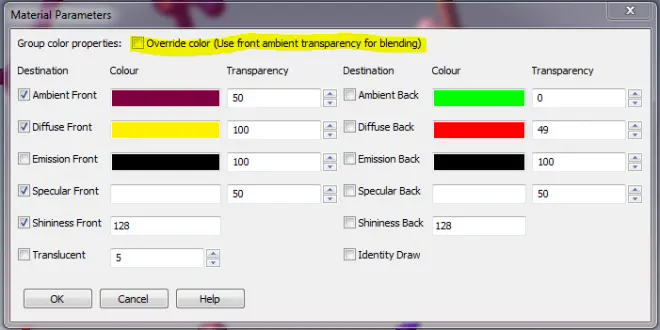
To enable the colour blending got to the Material properties dialog and un-tick the ‘Override color’ tick-box. After that the colour of the underlying objects will be mixed with the Ambient Front colour of the group, to change the proportion of the group’s colour, change the Transparency of the Ambient Front Colour.
译文如下:
3.4.4. 对片段均匀着色
你可以通过前面描述的方法之一进行选择,然后在指令行键入“group”。这将使得所选部分成为一个组合,并以一种颜色进行渲染。该组合的颜色可在“Material Properties”(Material Parameters)对话框中进行更改,方法是在该组合上单击鼠标右键,并从弹出的菜单中选择Graphics > Draw style。默认情况下,组合会覆盖已组合对象的颜色;不过,通过颜色融合可以实现某些特殊效果。
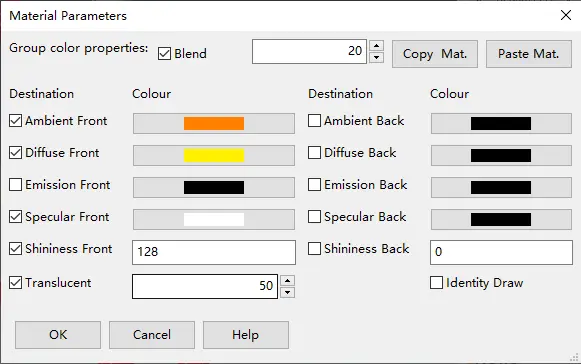
要启用颜色融合,请在“Material Properties”(Material Parameters)对话框并取消勾选“Override color”复选框(新版为勾上“Blend”复选框并设置其数值)。随后,底层对象的颜色将与组合的环境前(Ambient Front)颜色混合,要更改组合的颜色的比例,请更改环境前(Ambient Front)颜色的透明度(Transparency/Translucent)。
本文辅助视频如下:
3.4.4-对片段均匀着色
https://www.bilibili.com/video/BV1vK4y1S7BR
公众号文章链接:
https://mp.weixin.qq.com/s?__biz=MzU0NjkzMTM1MQ==&mid=2247485336&idx=2&sn=86f0dce88d0c59951d2535a37e169f3b&chksm=fb575060cc20d976e7c72d096151fabcbc719398dedeabd31f52a7d47e70f6f9c329a415883f&token=1550724737&lang=zh_CN#rd